Wired M-Bus bench
A page where you name a level converter and the bench finds every meter on the bus behind it, then reads them again and again for as long as you asked.
It needs an account. An administrator invites you, or you ask for one.
Use it when you are commissioning a riser, or when a building's readings are wrong and you want to see the wire: which meters are really on the bus, what they are reading now, and which of them have stopped answering.
This is the page that finds a meter on a bus. A system that collects readings reads the meters it already knows, by name. A bus whose meters nobody has written down cannot be read at all — this is the page that writes them down.
One session per converter. Two masters on one bus corrupt each other, so a second session on the same address is refused, and it says who is using it. Do not start a session on a converter while its building is being read.
Words used on this page
- A converter is a level converter: the box on a building's network that turns the network into the M-Bus's two wires. It is named by an address and a port.
- The search is the walk that finds every meter on a bus.
- A session is one search of one bus, and the reading that follows it.
- A round is one reading of every meter the search found.
- A meter's first reading is the one it was found by. Every change on the table is measured from it.
Signing in
An administrator invites you by email and sends you a link. Open it, choose a name and a password of at least ten characters, and the account exists.
You may also ask for an account. Press Ask for an account, under Sign in. Give your name, your email and why you need it, and press Send the request. Every administrator is sent an email about it. If one of them approves it, you are sent the link above by email. If nobody approves it, you are sent nothing.
There are three roles.
| Role | What it can do |
|---|---|
| Administrator | Everything, and the Users and Converters tabs. Sees every session and may stop any of them. |
| User | Starts sessions on any converter, and sees the ones they started. |
| Contractor | Starts a session only on a converter an administrator gave them, and reads only the meters listed on it. |
To change your own password, press Change my password, beside your name at the top. It asks for the one you have now. Every other browser signed in as you is signed out; the one you are using is not.
On a phone your name at the top is a button. Press it for Change my password, Help and Sign out.
If you cannot sign in at all, an administrator presses Reset the password on your row under Users and sends you the link it writes. You choose your own password; they never learn it. The link works once, and for seven days.
Starting a session
Fill the form and press Start, at the end of the panel.
| Field | What to write |
|---|---|
| Name | Optional, such as the building. Choosing a converter from the list fills this with its name. |
| Converter | One from the list, or Type an address and write it yourself. |
| Minutes of reading | How long it reads once the meters are known. At most 1440. |
| Converter address or name | The converter's address. The usual port is 10999. Grey and not for typing while a converter from the list is chosen, where it shows that converter's address. |
| Port | The converter's port. |
| Meters | Where the meters come from — see below. |
| Expected meters | Optional serial numbers, to see which of them the search finds. |

The session does not need your page. It runs on the bench, so you can close the tab, and come back to it from Recent or the session list. Closing the page does not stop it.
Where the meters come from
Search the bus walks every address and finds what answers. This is the one to use on a bus nobody has written down. Pick how carefully it looks:
| Search | Waits for an answer | If a mask is silent | Beside each find |
|---|---|---|---|
| Fast | 1 second, then 3 | asks again in a second pass | asks nothing more |
| Normal | 6 seconds | asks again at once | asks nothing more |
| Accurate | 11 seconds | asks again at once | asks the nine masks beside it |
A slow bus hides meters from a fast search. The first search of a real building found 19 of its 27 meters: behind a SIM, an answer came a second after it was asked for, and the search had already moved on. Use Accurate on a bus you do not know, and on anything behind a mobile connection.
From an export file skips the search entirely. The file names each meter's whole address, so the session reads those meters at once. Use it when you have read this bus before: it is faster, and it finds meters no search can.
Each change is then measured from the file's values, so a session started again from yesterday's file shows how far each meter has moved since yesterday, not since a minute ago.
From serial numbers looks for each number on its own, and lists any it
cannot find. The last eight digits are used, so HNY29514657 is 29514657.
Scan primary addresses asks each primary address in turn, for a bus whose meters answer that way.
Recent
The last five sessions you started in this browser are offered above the form, and the newest fills it when the page opens. Choosing one fills the form; it starts nothing. Another account in the same browser sees none of yours.
While it reads
Stop search ends the search and starts the reading at once. A search can take an hour, and if the meters you came for are already on the table there is no reason to wait for the rest of the bus.
A line of facts above the table says what the session is doing: its state, who started it, how far the search has come, how many meters it has found, how many rounds it has read, and when it stops.

The table has a row for each meter, and under it a row for each quantity it is reading now. A value that has changed since its first reading is marked:
- a green arrow up and the size of the change, for a counter that rose;
- an orange arrow down, for one that fell;
- a tilde, for a gauge that moved — power, flow, pressure — which goes up and down in normal use, and keeps the mark once it has moved.
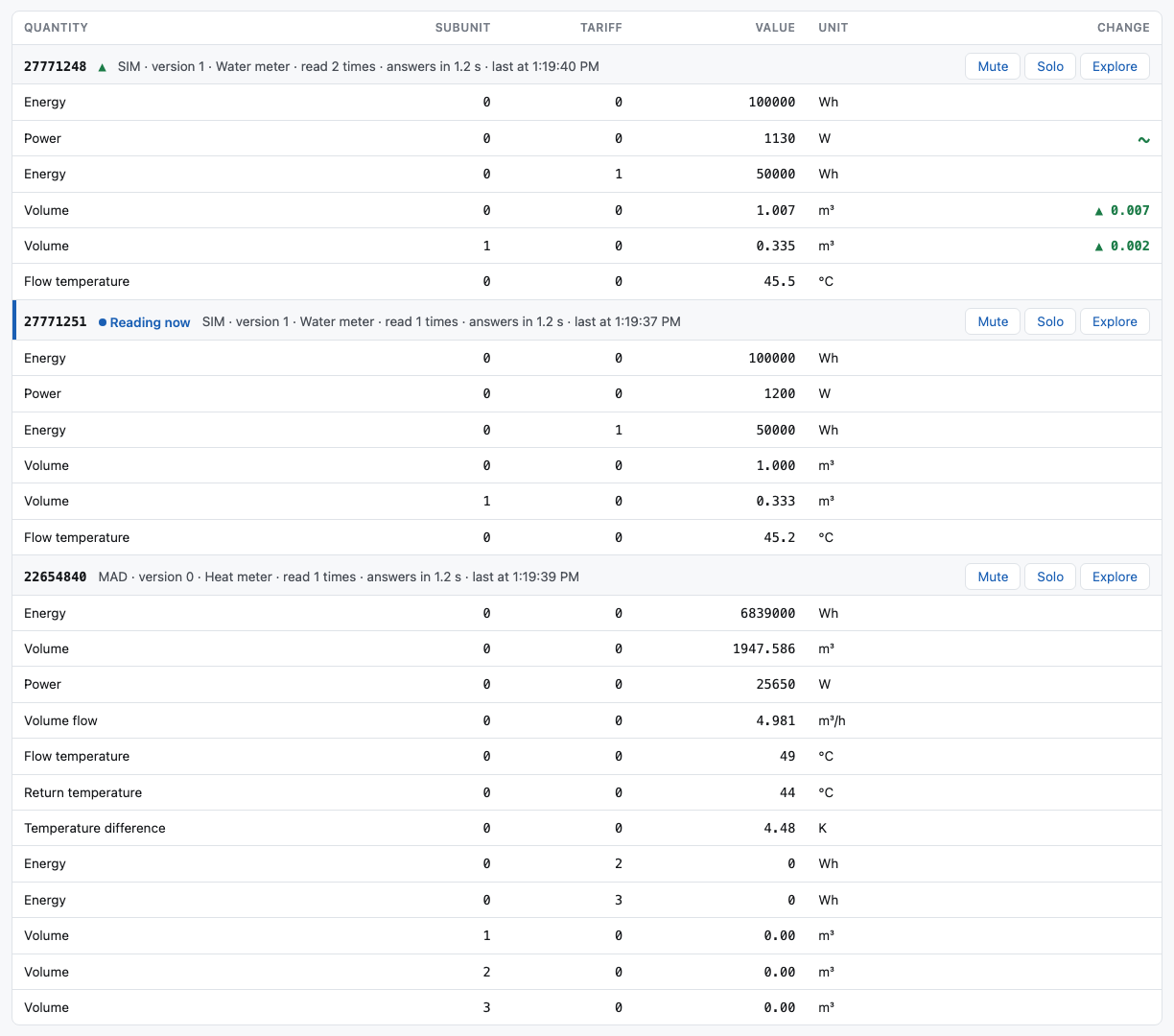
A meter that stops answering is marked as not answering, and stays on the table.
Reading some meters and not others
Each meter's row carries three buttons.
| Mute | Leave this meter out of the rounds. Any number of meters can be muted. |
| Solo | Read this meter alone. One meter at a time; soloing another moves the solo to it. |
| Explore | Take this meter's latest frame to the M-Bus Explorer. |
Use them when one meter is the one you care about, or when a slow meter is holding up a round you want to watch. They take effect from the next meter asked, not the next round.
Mute and Solo do not cancel each other. A soloed meter is read even when it is muted, and ending a solo leaves every mute as it was. A meter the rounds skip keeps its row, its values and everything it had, faded, and is labelled Muted or Solo — and nothing is ever left out of an export.
They belong to the session, not to your page. Everybody who has it open sees the same thing, and anybody who may stop the session may change them.
Extend by 60 min — the button says the number it adds, which is the time the session was started with. Press it again for another 60. It can reach no further than a session could be started for, and the button goes away when there is no room left.
Stop ends the reading. It takes a moment: the session finishes asking the meter it is on, and the page says so while it waits.
Notify me when the search ends asks your browser to tell you. A search of a whole riser takes a long time, and this is how you leave the tab and come back when there is something to see.
Sharing a session
Share gives you a link. Send it to a colleague who has an account here; opening it joins them to the session, once. After that they see it in their own list with no link at all, and the link stops being a way in.
A contractor cannot share a session.
Afterwards
Export offers three files.
| Table | Every meter and quantity, with the first value and the latest, as CSV. |
| Frames | Every frame, as CSV for the M-Bus Explorer. |
| Raw data | Every byte sent and received, as text. |
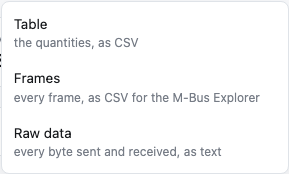
Keep the table. A later session started from that file skips the search entirely, and measures every change from these values — so tomorrow's session shows how far each meter has moved since today.
Frames is what to take to the M-Bus Explorer when a meter reads oddly and you want to see the telegram itself. Raw data is for when the bus does not answer at all, and the question is what went down the wire.
A session stays in the list for 12 hours after it ends, so you can read it again or export it. Read again dials the converter again and reads the same meters, onto the same table.
What an administrator keeps

Converters is the list of level converters, so nobody has to remember an address. A converter may also carry a list of meters, which is what a contractor may read on it. The list says how many meters each one carries. Add a converter opens a window with a name, an address, a port and the meters; Change opens the same window, filled with that converter, and is where the meters are read and edited.

Users is the accounts: who they are, their role, and whether they are active. Disable stops an account signing in at once. A contractor's Converters button is where you give them a converter and the meters on it, and you can settle both before they have accepted their invitation.
Requests for an account, at the top of Users, are the people who asked for one. Every administrator is sent an email for each. Choose a role in the row (Contractor is offered first) and press Approve: the bench writes an ordinary invitation and sends its link to the person by email. Where the bench cannot send email, it shows the link to copy instead. Reject asks first; the person is sent nothing, because the email was typed by whoever asked and may be somebody else's. One address can send three requests in an hour, at most twenty wait at once, and a request is deleted after 30 days.
Limits
| Sessions running at once | 16 |
| Sessions at once, one user | 2 |
| Sessions at once, one administrator | 8 |
| Reading time | at most 1440 minutes; 60 by default |
| An ended session stays in the list | 12 hours |
| Recent sessions offered | the last 5 |
| An invitation, and a reset link | 7 days, and one use |
| Requests for an account | 3 an hour from one address; 20 waiting at once |
Why it is not the system that collects the readings
This bench finds meters and reads them; it sends what it reads to nobody. A system that collects readings reads the meters it already knows, on a schedule. Both speak to the same converters through the same two wires, and they decode with the same decoder, so the two cannot disagree about a meter.